Make a multi-size .ico from PNG, JPG, WebP, or SVG — or drop an existing .ico to split its frames into PNG. Built for “I need an .ico file” and quick frame export; for a dedicated extract flow see ICO to PNG. Everything runs in your browser — no upload.
PNG · JPG · WebP · SVG · ICO — nothing is ever uploaded
Images are decoded and resized with Canvas in your browser. Your image data is never uploaded for conversion.
One pass builds a multi-size .ico and a favicon.zip with PNG sizes you checked.
Copy ready-to-paste <link rel="icon"> tags for your site.
Free, no signup, no preview unlock — drop, download, done.
Drop PNG, JPG, WebP, or SVG here, check sizes, and download. This page is optimized for “I need an .ico file” — Windows icons and favicon.ico — while Icon Converter is the broader image-to-icon + favicon workflow.
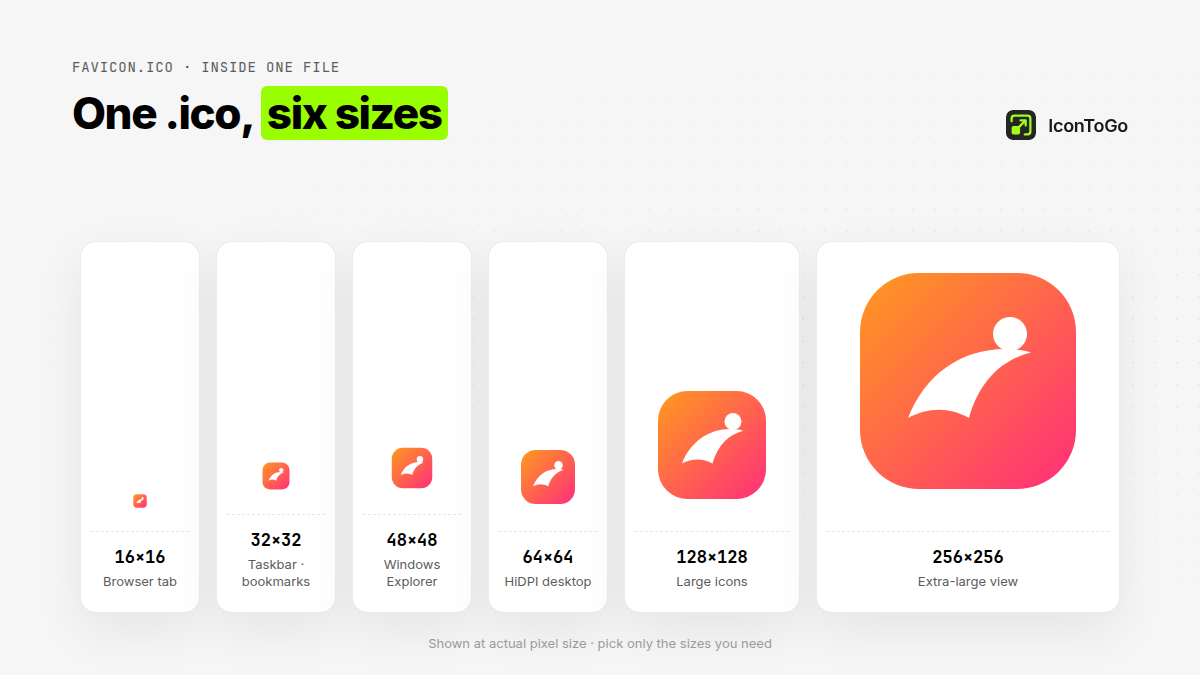
All packing is local. Choose 16–256 sizes, download multi-size .ico, and optionally export favicon.zip with a head snippet.
An .ico can store several resolutions in one container; PNG favicons are single images linked from HTML. Many sites ship both.
Yes — drop a .ico into the zone above to split frames into PNG (or ZIP). Prefer a dedicated extractor? Use ICO to PNG.
According to MDN’s favicon glossary and the Wikipedia ICO file-format article, sites typically expose multiple icon sizes; IconToGo exports those sizes as one local pack.
A container that can hold several icon resolutions (16–256+). Browsers and Windows use it for favicons and app icons.
Yes. Drop a .ico here to preview and download each frame as PNG (or a ZIP). For a dedicated ICO→PNG experience see ICO to PNG.
Drop PNG, JPG, WebP, or SVG, check sizes, and download .ico or favicon.zip — all local, no upload.
Logos are brand assets — keeping them off upload converters reduces leakage risk.
 IconToGo